
Data Dive is one of the most process-driven Amazon research tools I've used — and for serious private label sellers, it's genuinely hard to beat.
Most Amazon tools give you a pile of numbers and leave the decision-making to you. Data Dive is built differently. It connects niche discovery, keyword research, profit modeling, listing optimization, and rank tracking into one structured workflow, and the result is a tool that doesn't just show you data, it pushes you toward better decisions.
I've personally tested Data Dive across product research, listing builds, and post-launch monitoring, and here's my honest take.
This is not a tool for sellers who want a quick, surface-level browser extension. Data Dive has real depth, a defined learning curve, and an opinionated workflow. That's a feature, not a bug — but it's something you need to know going in.
If you're a brand owner, private label seller, or agency managing multiple products, Data Dive belongs at the top of your shortlist in 2026. If you're brand new and want the simplest possible tool, it may feel like more than you need right now.
AFFiNCO's Rating
| Rating | 4.7/5 ★★★★★ |
|---|---|
| 💵 Price | From $39/month to $490/month |
| 🔍 Features | Dives, MKL, Product Scorecard, Listing Builder, Rank Radar, PPC Tools, AI Copywriter, Niche Pipeline |
| 🎯 Accuracy | Excellent — niche-specific keyword modeling tied directly to listing scoring |
| 👥 Support | Strong — knowledge base, Office Hours, masterclasses, live support on higher tiers |
| 🖥️ User Interface | Clean but layered — expect a learning curve on day one |
| 🔥 Discount | 20% OFF with code AMZNINJA |
What Is Data Dive and What Does It Offer?
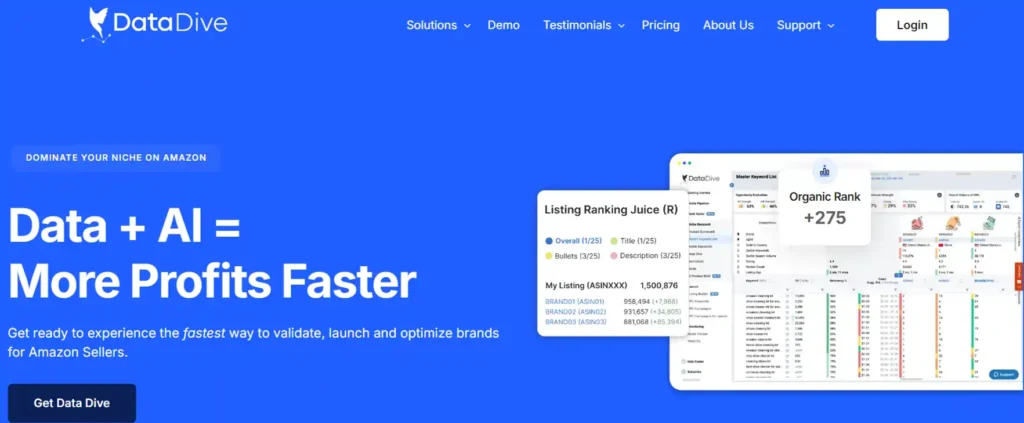
Data Dive is an Amazon product research and analytics platform designed around a core idea: the decision to launch a product should be backed by a complete, structured research process not just a search volume estimate.
The platform was built specifically for Amazon FBA and private label sellers. Its workflow runs from product validation all the way through post-launch rank monitoring, and every step is connected. You don't bounce between six different tools; you move through one system.
The core features inside Data Dive include Dives (the research unit), the Master Keyword List (MKL), Product Scorecard, Profits (margin modeling), Listing Builder with the proprietary Ranking Juice scoring system, an AI Copywriter, Rank Radar for daily rank and PPC tracking, and the Niche Pipeline for managing multiple projects across a team.
The platform also includes an API for Standard and Enterprise users, and its documented workflow — Start Dive → Clean MKL → Product Scorecard → Profits → AI Product Brief — tells you everything about how it's designed to be used.
Data Dive Coupon Unlock Hidden Amazon Profits Fast
Scale your Amazon FBA business with Data Dive—apply code AMZNINJA now and grab an exclusive 20% off discount.
User Experience & Interface
Data Dive's interface is clean and well-organized — it's not cluttered or confusing in the way some older Amazon tools are. That said, the depth of the platform means there's a real learning curve on day one.
The workflow is opinionated (Start Dive → Clean MKL → Scorecard → Profits → Listing Builder), and once you understand the logic, navigation becomes intuitive. But if you skip the documentation and try to wing it, you'll miss how the pieces connect.
Data Dive offsets this with Office Hours sessions, masterclasses, and a detailed help center. I'd strongly recommend going through at least one workflow walkthrough before judging the UI fairly. The Chrome extension requirement is also worth flagging — if you're not primarily working in Chrome, some friction is unavoidable.
Key Features & Tools
1) Dives and the Master Keyword List (MKL)
A Dive is Data Dive's core research unit. You enter a niche or set of seed ASINs, and the platform generates a Master Keyword List, but not a flat keyword dump.
The MKL is organised into three layers: MKL (primary, high-relevance terms), Outliers (high-volume fringe keywords where fewer competitors rank), and Residue (remaining competitor rankings that don't fit core or outlier criteria). That segmentation is far more useful than a raw list because it immediately separates core demand from edge opportunity.
2) Product Scorecard and Profits Tool
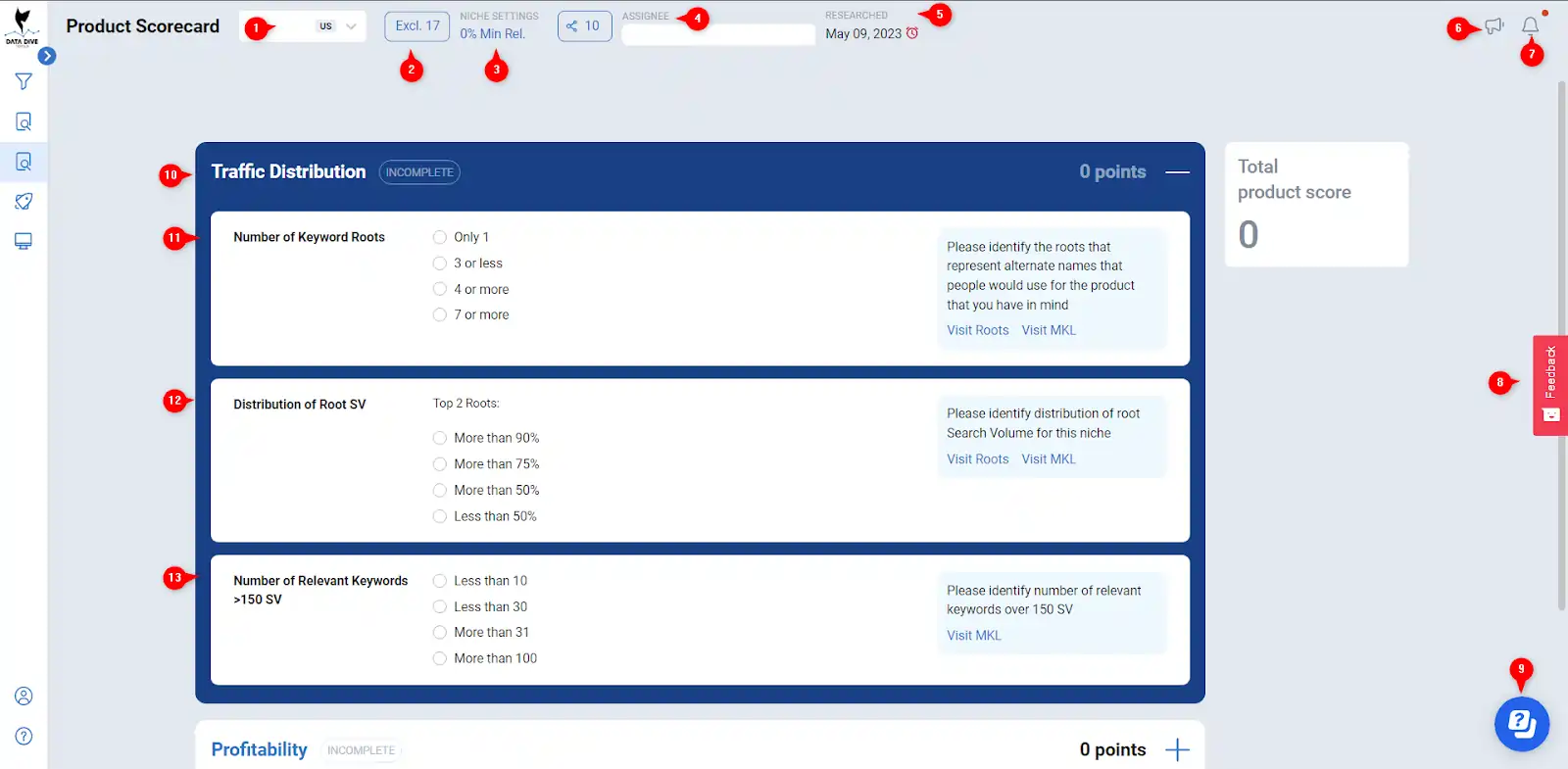
Once your MKL is clean, Data Dive routes you to the Product Scorecard — an evaluation across traffic distribution, competitiveness, profitability, and potential. Think of it as a sanity check before you spend a dollar on sourcing or sampling.
The Profits tool goes deeper: it models landed cost, Amazon fees, FBA storage, PPC spend, gross profit, and estimated launch budget. The combination of scorecard + profits means you're not guessing at margins, you're seeing the economics of the niche before you're committed to it.
This is the feature I find most underrated. Most tools stop at traffic estimates; Data Dive connects demand directly to viability.
3) Listing Builder and Ranking Juice
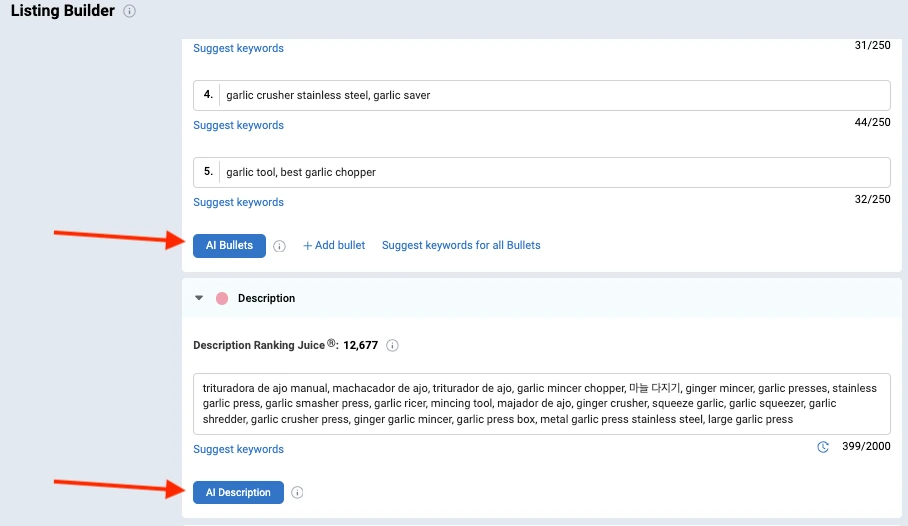
This is one of Data Dive's clearest differentiators. The Listing Builder is built around a proprietary scoring model called Ranking Juice, which evaluates listing strength based on keyword coverage, match type, field position, and search volume.
Exact match keywords score higher than phrase or broad, and title placement carries a stronger multiplier than bullets or description.
The Optimize Ranking Juice function suggests where to place specific keywords across your title, bullets, and description.
It doesn't just generate text, it shows you why certain placements matter more. For sellers who care about organic ranking, this is a genuinely useful SEO framework, not marketing fluff.
4) AI Copywriter and AI Product Brief
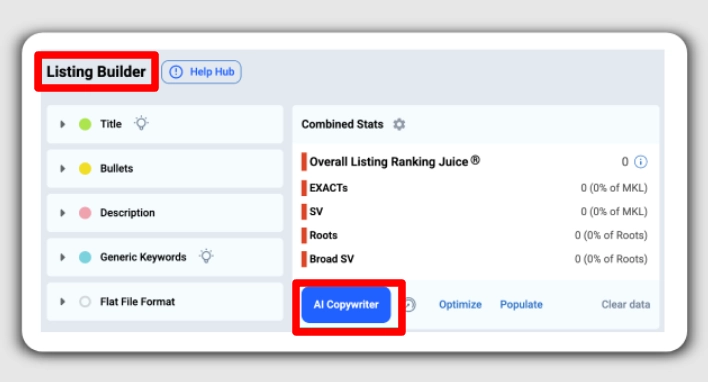
Data Dive's AI Copywriter is tied directly to your niche's keyword list — it doesn't write generic Amazon copy, it writes from your MKL. The AI Product Brief auto-selects high-priority keywords and generates a structured brief for your listing, which the AI Copywriter can then expand into bullets and descriptions.
The platform uses ChatGPT as the underlying model, but the value is in the keyword-first approach, not the AI model itself.
This workflow from research to brief to listing draft is more connected than anything I've seen in competing tools at this price point.
5) Rank Radar (Daily Rank + PPC Tracking)
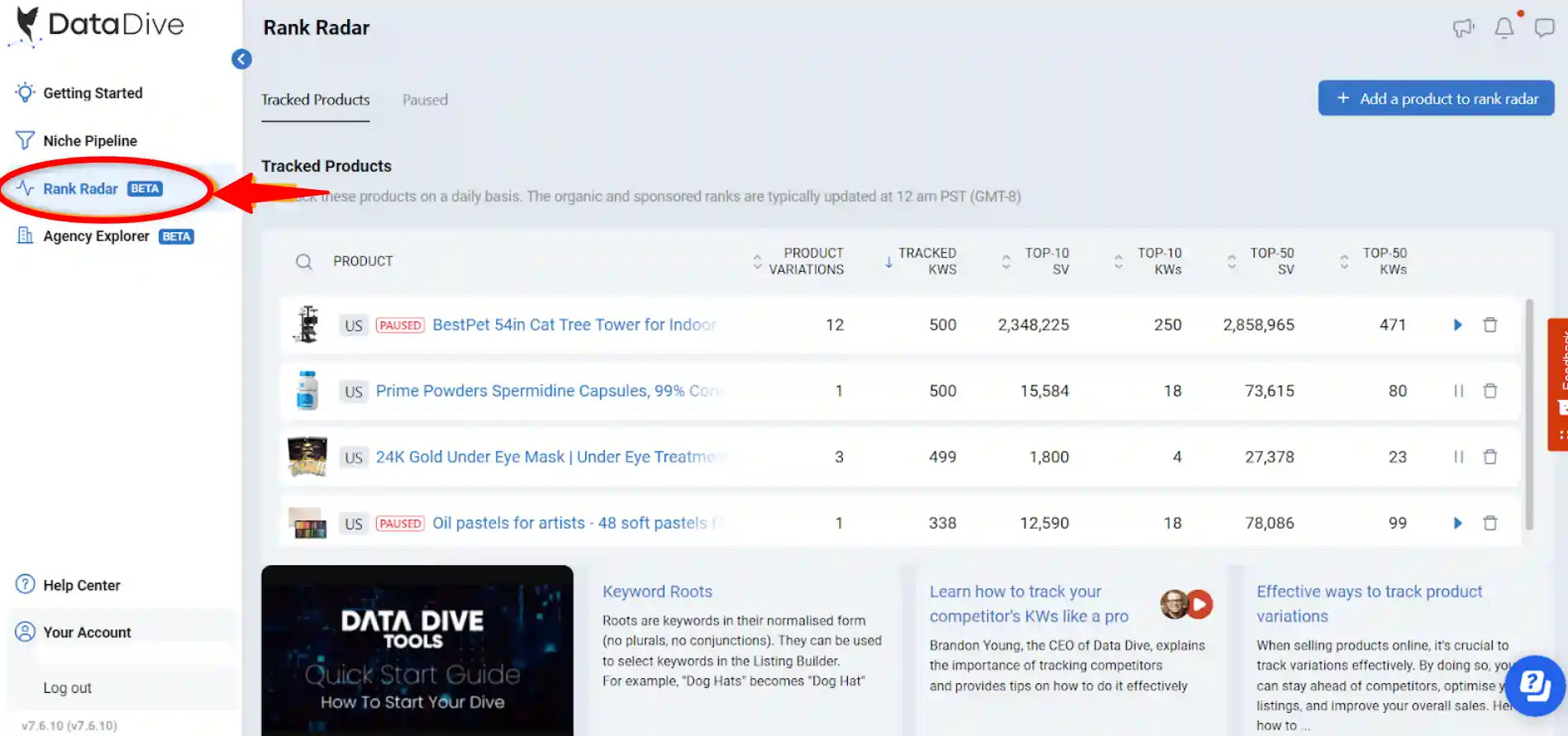
Rank Radar updates daily and combines organic rank tracking with PPC data in one view. The standout feature here is Blind Spend, which flags keywords where you're spending ad budget but have no tracking set up.
It also breaks rankings down by child ASIN / product variation, which is critical for sellers managing multiple SKUs under the same parent.
Most rank trackers give you a number. Rank Radar gives you a number, a PPC context, and an action signal.
6) Niche Pipeline
The Niche Pipeline is a portfolio management dashboard for all your Dives. It supports filtering, labels, spaces, comments, assignment to team members, and at-a-glance visibility into scorecard status, competitor counts, and recency.
For agencies or sellers managing 10+ active research projects simultaneously, this is the feature that makes Data Dive feel like professional infrastructure rather than a hobbyist tool.
Data Dive Feature Comparison
| Feature | Data Dive | Helium 10 | Jungle Scout |
|---|---|---|---|
| Structured niche validation workflow | ✅ Yes | ⚠️ Partial | ⚠️ Partial |
| Proprietary listing score (Ranking Juice) | ✅ Yes | ❌ No | ❌ No |
| Daily rank tracking + PPC integration | ✅ Yes | ✅ Yes | ⚠️ Limited |
| AI copywriter tied to niche keywords | ✅ Yes | ✅ Yes | ⚠️ Partial |
| Profit + launch budget modeling | ✅ Yes | ✅ Yes | ✅ Yes |
| Team collaboration + pipeline management | ✅ Yes | ⚠️ Limited | ⚠️ Limited |
| API access | ✅ Standard+ | ✅ Diamond only | ❌ No |
| Child ASIN rank tracking | ✅ Yes | ✅ Yes | ⚠️ Limited |
Data Dive Pricing & Plans
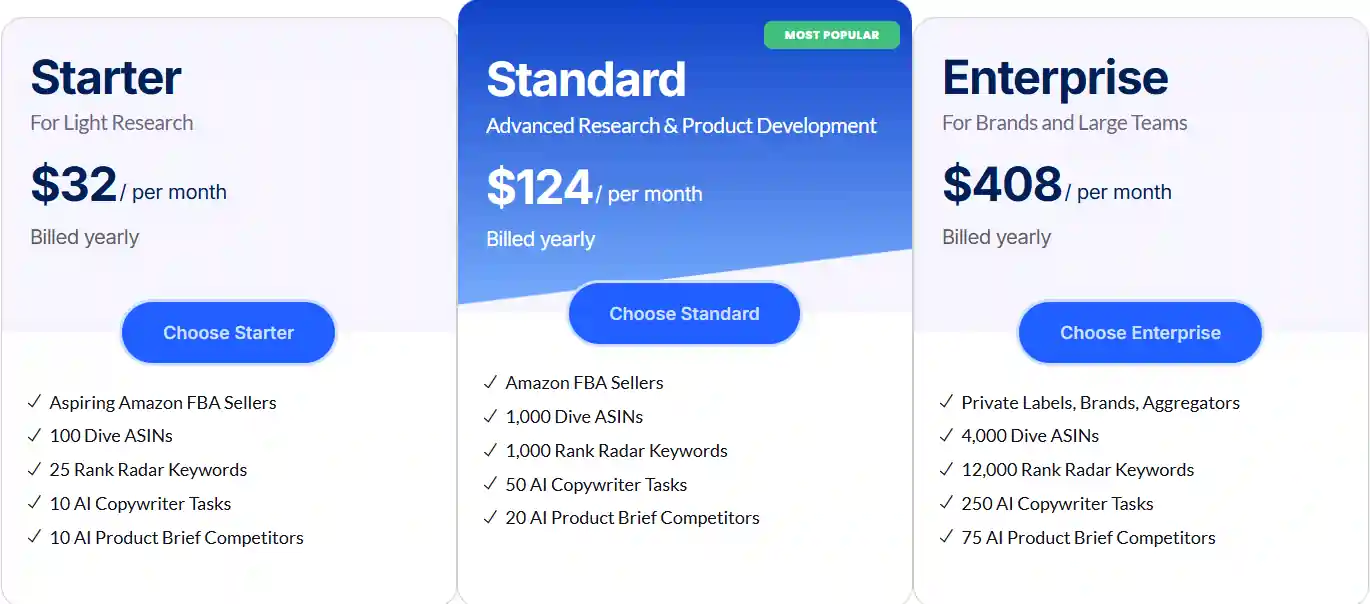
Data Dive's public pricing is as follows:
| Plan | Monthly Price | Annual Price (per month) | Key Inclusions |
|---|---|---|---|
| Starter | $39/month | $32/month | 100 Dive ASINs, 25 Rank Radar keywords, 10 AI tasks, 1 seat, KB support |
| Standard | $149/month | $124/month | Larger quotas, 10 team members, comments, API access, live support |
| Enterprise | $490/month | $408/month | Max quotas, hierarchy, audit logs, broad Seller Central accounts, dedicated support |
Data Dive also offers a 14-day free trial with all features unlocked, and the plans include flexible sliders so you can customize Dive ASIN limits, Rank Radar keyword caps, and AI task quotas without jumping to the next full tier.
My recommendation: Most active sellers land on Standard. The 10-seat team access, larger quotas, API access, and live support make it the right fit for anyone managing more than one or two products seriously.
Starter is worth using during your trial phase or for a first product validation. Enterprise is for agencies and aggregators, the audit logs and hierarchy make it genuinely useful at that scale.
The annual billing saves roughly 17-18%, which adds up fast on Standard or Enterprise.
Who Is Data Dive Best For?

Data Dive is purpose-built for sellers who take product decisions seriously. Specifically:
If you've ever launched a product that flopped because the niche looked good on paper but the keyword demand or margins didn't hold up — Data Dive is built to catch exactly that kind of mistake before it costs you.
Pros & Cons
| ✅ Pros | ❌ Cons |
|---|---|
| Structured workflow from research to launch | Real learning curve for new users |
| Unique Ranking Juice listing score system | Chrome extension required for core features |
| Daily rank tracking with PPC integration | Starter plan grows restrictive quickly |
| AI copywriter tied to niche-specific keywords | Can't manually add keywords directly to MKL |
| Excellent niche validation with profit modeling | Marketplace coverage varies — verify before buying |
| Team collaboration tools + API access | No offline or mobile-native experience |
| Flexible slider-based plan customization | Depth may overwhelm beginners |
| 14-day free trial, no credit card pressure | — |
Customer Support
Data Dive's support quality scales with your plan. Starter gets knowledge-base access, which is actually quite good — the help center is thorough and well-maintained. Standard and Enterprise unlock live support, which is meaningfully better for complex workflow questions.
Beyond reactive support, Data Dive runs regular Office Hours and masterclasses, which function more like training than support.
If you're new to the platform, these sessions are probably the fastest way to get up to speed. Response quality from the team is consistently strong based on community feedback and my own experience submitting questions.
Data Dive vs Competitors
| Data Dive | Helium 10 | Jungle Scout | |
|---|---|---|---|
| Best For | Niche validation + listing SEO | All-in-one suite | Beginners + product discovery |
| Starting Price | $39/month | $39/month | $49/month |
| Listing Optimization | ✅ Ranking Juice system | ✅ Listing Analyzer | ⚠️ Basic |
| Workflow Structure | ✅ End-to-end validation flow | ⚠️ Modular, less guided | ⚠️ Modular |
| PPC Integration | ✅ Rank Radar + Blind Spend | ✅ Adtomic (paid add-on) | ⚠️ Limited |
| Team Features | ✅ Strong | ⚠️ Limited on lower tiers | ⚠️ Limited |
| Learning Curve | Moderate-High | Moderate | Low-Moderate |
| Free Trial | ✅ 14 days (all features) | ✅ 7 days | ✅ 7 days |
Choose Data Dive over Helium 10 if your priority is niche validation quality and listing SEO structure. Helium 10 is a broader all-in-one suite with more tools in total, but Data Dive's core workflow is more coherent and its listing optimization system is more actionable.
Choose Data Dive over Jungle Scout if you're past the beginner stage and want a tool that supports repeatable, scalable processes. Jungle Scout is a solid entry point, but it doesn't offer the same depth for listing SEO or team operations.
What I Like and Don't Like
What I like most about Data Dive:
The workflow-first philosophy is the thing I come back to. It's not just a data tool — it forces you to think through a launch properly.
The Ranking Juice system is genuinely useful, not a gimmick.
And daily rank tracking with blind-spend visibility is more actionable than anything I've seen in the same price range.
What I don't like:
The Chrome dependency is a real constraint for some workflows. The Starter plan is limiting enough that most users will feel the ceiling within a few weeks.
And the inability to manually add keywords directly into the MKL means you have to work the system on its own terms, which is fine philosophically but occasionally inconvenient in practice.
Overall, the tradeoffs are worth it for the right user. The limitations are real but predictable.
Exclusive Datadive Discount
If you're ready to try Data Dive, use coupon code AMZNINJA at checkout to get 20% OFF all plans — including annual billing, which already saves you another 17%.
| Plan | Regular Monthly | After AMZNINJA (20% Off) | Annual + AMZNINJA Savings |
|---|---|---|---|
| Starter | $39/month | ~$31.20/month | Best value combo |
| Standard | $149/month | ~$119.20/month | Significant savings |
| Enterprise | $490/month | ~$392/month | Maximum savings |
The 14-day free trial still applies, so you can test the full platform before your first charge, and the discount applies when you convert to a paid plan.
Frequently Asked Questions
Does Data Dive require an Amazon Seller account to get started?
Data Dive's offer page is explicit about this: you can research and validate products before opening a Seller Central account. This makes it useful even during the pre-launch research phase.
Is there a free trial, and does it include all features?
Data Dive offers a 14-day free trial with full access to all platform features during the trial window. No partial access or locked features while you're evaluating.
Can I cancel my subscription anytime?
Yes. Data Dive explicitly states there are no long-term contracts, and you can upgrade, downgrade, or cancel at any time. There's no penalty for canceling before the next billing cycle.
Which Amazon marketplaces does Data Dive support?
The official documentation currently lists support for United States, United Kingdom, Canada, Germany, France, Spain, Italy, Mexico, India, and Japan. If you sell in a marketplace not on that list, verify directly with support before subscribing.
Does Data Dive work in browsers other than Chrome?
You can access the dashboard from other browsers, but the Chrome extension is required for running Dives and certain advanced research features. Data Dive recommends Chrome for the full experience.
Who gets API access?
API access is available on Standard and Enterprise plans only. Starter does not include it. For teams building integrations or automating research workflows, this makes Standard the minimum viable tier.
Final Verdict
Data Dive earns a 4.7/5 from me, and it's the tool I'd recommend to any Amazon seller who's serious about making better launch and listing decisions.
Its combination of structured workflow, niche validation, Ranking Juice listing SEO, and PPC-connected rank tracking is more coherent than any comparable tool in this price range.
The learning curve is real, and the Chrome dependency is a constraint worth knowing about. But if you're willing to work within the system, the payoff in decision quality is significant.
Rating


Ali
Ali is a digital marketing expert with 7+ years of experience in SEO-optimized blogging. Skilled in reviewing SaaS tools, social media marketing, and email campaigns, we craft content that ranks well and engages audiences. Known for providing genuine information, Ali is a reliable source for businesses seeking to boost their online presence effectively.